Overcoming Automation Bottlenecks with Agentic AI
TL;DR
Engineering workflows (or, in other words, automation scripts/suites) are amazing to have, since they save a lot of time and result in massive gains in efficiency. At the same time, they are expensive to build, maintain, and scale.
The software stack in an enterprise gets updated periodically, requiring us to update the workflows along with it. Things become even more complicated when the engineer who built the workflow 10 years ago leaves the organization.
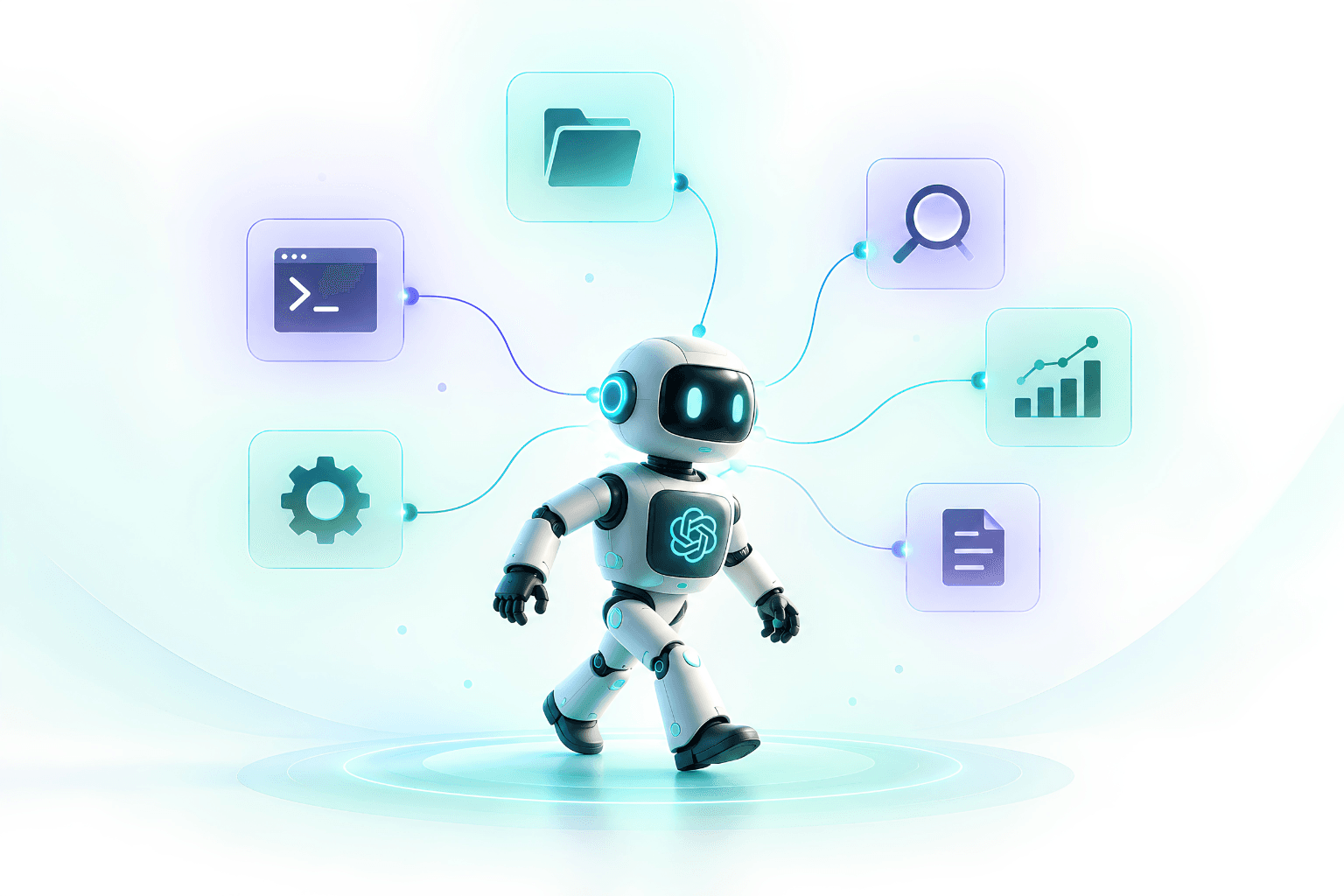
Generative AI can enhance workflows by interpreting unstructured inputs and interacting with software tools. Agentic AI goes a step further, using these capabilities in a closed loop to observe, decide, act, and adapt.
In this blog, we talk about how agentic AI differs from conventional workflows, where each approach works well, and the pros and cons of using one over the other. We close with the new challenges that agentic AI brings to the table.
The world without automation
Consider a team running external aerodynamic studies across multiple vehicle design iterations. A typical design change might involve a revised exterior, a change in ride height, or a new underbody panel. While the solve may run overnight on a cluster, significant engineering effort happens before the solve. This includes importing and repairing CAD, simplifying geometry, generating and validating the mesh, defining boundaries, and setting up operating conditions.
Many of these tasks, such as meshing and solver setup, are repetitive and can be automated. It reduces the time spent on repetitive work, and makes the process more consistent across analysts and teams.
Automating this process requires:
1. Deep knowledge of automation tools
2. Deployable environment where the scripts can live
3. Most importantly, the scripts must always follow a sequence of independent steps that work almost in all situations.
Where to start if you are new to automation
Automation of engineering work is not new. Teams have used journal files, macros, batch jobs, build pipelines, and ETL processes to automate work that follows a known pattern. The approach is simple: define the steps once and run them again for new inputs.
For teams that have not yet automated their workflows, this is where to start.
This gets you to have some structure in execution. Further, it also has the following benefits:
1. Scripting makes the process explicit and provides a baseline for understanding how long a case takes, which steps are repeatable, and where engineering judgement is still required.
2. It also gives us a clear way to identify where conventional automation is less effective.
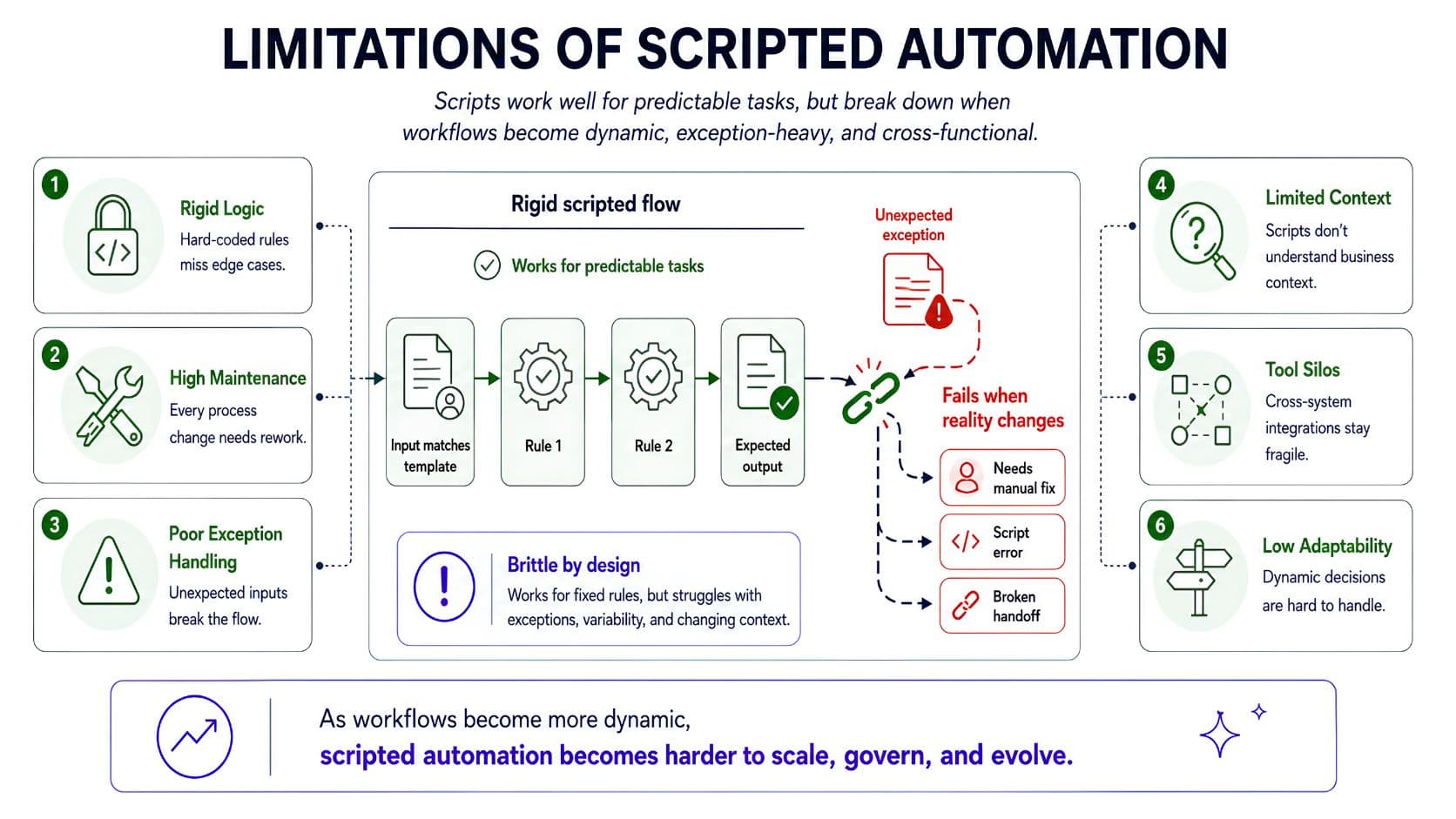
As workflows evolve, supporting more cases typically means adding more rules and branches to the script. Over time, this makes the automation harder to maintain and its operating envelope harder to define. The opportunity, then, is to introduce decision-making where deterministic scripting reaches its limits, which brings us to AI agents.
Agent-driven workflows
The term AI agent is used in several contexts, including reinforcement learning, so it is worth clarifying what we mean here. The AI agent discussed here is an LLM that has the capability to execute tools in addition to producing text only. More information can be found here. It is highly encouraged to read through this article since a lot of terms used below assume a basic knowledge of AI agents.
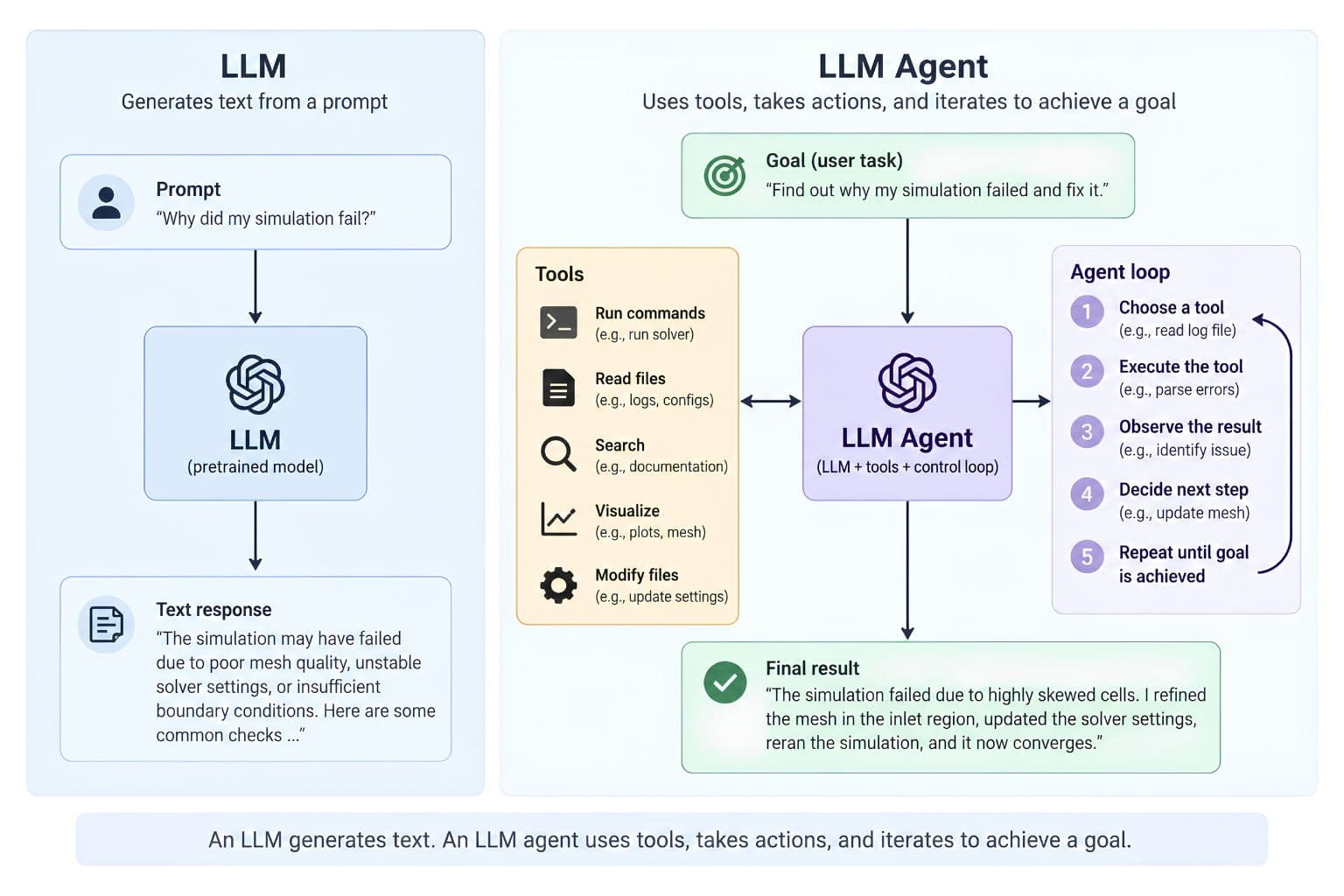
This is the key difference from a scripted workflow. In a script, the execution path is largely defined before the run.
In an agentic workflow, the path is selected intelligently based on the state of the current case.
Below is a table that offers some information on differences of execution.
| Scripted validation step | AI Agent | |
| How the report is treated | As a binary condition. The report is either ignored entirely or checked against a predefined set of strings, thresholds, or exit codes. | Interpreted in the context of the current case. |
| How warnings are separated | Each warning matches a rule or it does not. There is no notion of one warning mattering more than another. | Relevant warnings are identified and their likely impact assessed. |
| What the step can do next | Continue or stop. | Proceed, modify the current setup, or return to an earlier stage with a targeted change to a specific parameter. |
| What the decision is based on | Rules written before the run, covering the cases the author anticipated. | The state the workflow has actually reached. |
| Behaviour outside the validated envelope | The same sequence runs whether or not the case resembles the ones used for validation. | The path is selected incrementally, so an earlier assumption can be revisited. |
The trade-off between flexibility and control for Agentic AI
Fully autonomous agents offer the most flexibility, but their execution can be harder to predict and validate.
At Curlscape, we have built and tested both the agent driven and script based automations for various use cases like CAD creation, CFD design automation etc.
Based on our learnings, we have architected and built hybrid agents, which take best of both worlds in terms of automation.
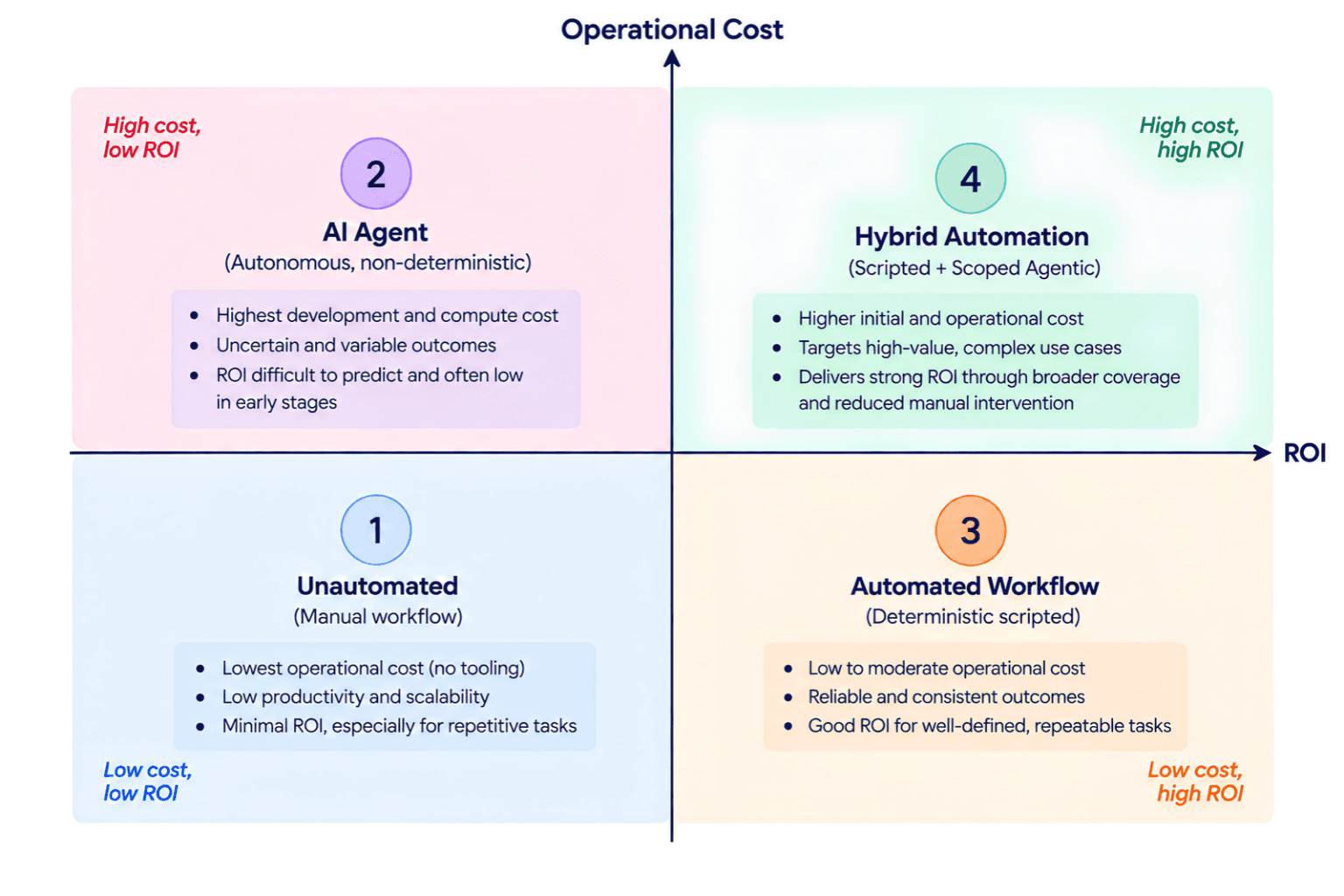
- Low cost and Low ROI (Un-automated):
- Low cost of operations and least benefits.
- You can start here and slowly automate the workflow
- Low cost and Mid-High ROI (Automated Workflow):
- Automation can bring about efficiency and bring in repeatability/traceability
- Fails when underlying systems change - such as upgraded software
- High cost and Low-Mid ROI (AI Agent):
- AI agents are great to spin off quickly
- The cost of operations are very high, especially for very high volume
- Stochastic outputs are the major cons
- Need a very strong evaluation harness for trusted and repeatable outcomes which is difficult for safety critical nature of the engineering workflows
- Mid-High cost and High ROI (Hybrid Automation):
- Brings in the intelligent decision making in workflow
- Cost of operations is low due to AI not being used all the time
- Underlying tools/softwares can change because AI agents can self-correct in failure terms
- Reduces the stochasticity with defined workflows
How are edge cases handled in production?
The hybrid approach keeps the workflow structure and acceptance criteria fixed, while giving the agent flexibility in how it meets them. But what happens when a stage still fails its acceptance criterion?
This is where the ability to reason about the current state becomes useful. A script typically stops and requires an engineer to diagnose the problem, while an agent can inspect the failure, form a hypothesis about its cause, make a targeted change, and retry the stage.
For this recovery to work, the failure needs to provide enough information to act on. “Mesh quality failed” is not enough. The system needs to identify what failed, where, and why. It should also trace the problem back to the stage that introduced it, rather than simply trying to fix where the problem became visible.
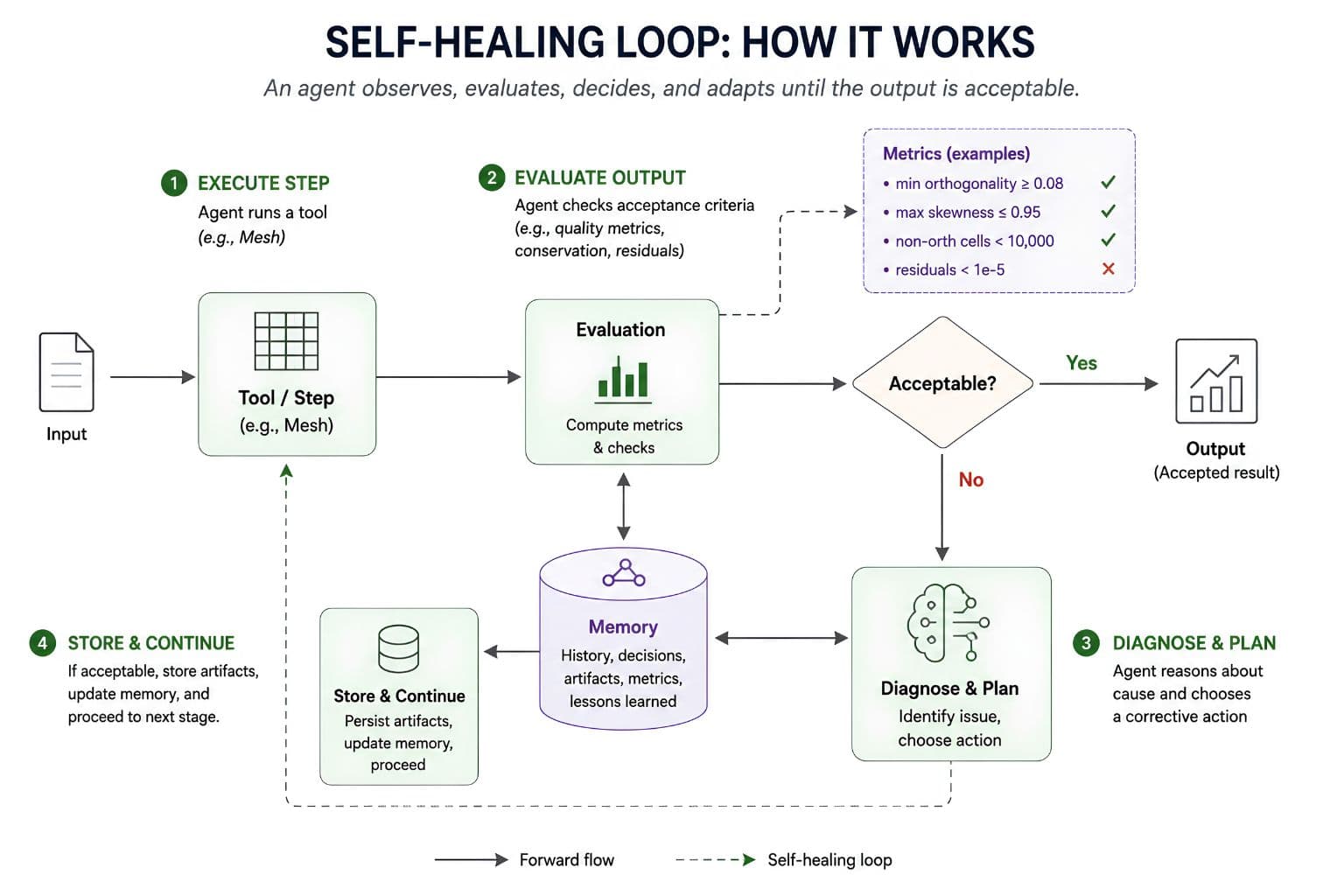
For example, if a solver diverges because of a sliver in the original geometry, changing solver settings may only mask the symptom. Effective recovery means identifying the root cause, correcting it at the right stage, and then continuing the workflow.
But this introduces a new question: how do we know the agent made the right decision and that the recovered result can be trusted? This is where evaluation becomes critical.
How to know if the results can be trusted?
The edge case handling discussed in the previous section brings us to the main challenge with agentic workflows: verification and validation.
Scripts focus on anticipating cases and defining rules, while agents can respond to cases that were not explicitly anticipated. The challenge is now verifying that those decisions are sound.
Evaluation needs to look beyond whether the workflow finished:
- Does the underlying physics hold? And does it fit well in the overall scope of what is being achieved?
- Is the result correct and traceable? It should be supported by the artifacts produced during the run.
- Was the path taken to avoid error valid? The agent should address the root cause, not just the symptom.
- Can we distinguish engineering failures from infrastructure failures? A timeout or unavailable tool should not be treated as an engineering failure.
In the next blog, we will look at how to evaluate agentic workflows and determine whether an agent is making sound decisions, not just completing the task.
Building AI into an engineering or product team?
We build AI systems for engineering and enterprise teams. Get in touch and you'll be talking to engineers, not a sales desk.
Get in touch
Written by
Samudyata Minasandra
Samudyata is a Software Engineer at Curlscape focused on machine learning and artificial intelligence, with a strong grounding in mathematics. Particularly interested in the mathematical foundations of learning algorithms:
Linear algebra, probability, optimization, and graph-based methods, and in applying them to build reliable, interpretable, and scalable systems.
Frequently Asked Questions
What does Curlscape do?▼
Curlscape builds AI systems that carry out engineering work rather than describing it. The work falls into three areas. The first is agentic automation for engineering and simulation teams, where agents handle CAD preparation, meshing, and solver setup, along with surrogate models that return a prediction in place of a full solve. The second is infrastructure and data services for organisations where data privacy, cost, or control rules out off-the-shelf AI, including fine-tuned models, air-gapped deployments, and document intelligence. The third is custom production agents wired into existing databases, APIs, CRM, ERP, and document systems.
What does agentic AI mean in an engineering context?▼
It means a closed loop rather than a fixed sequence. The system observes the current state of a case, selects and runs a tool, reads the result, and decides what to do next. The tools are the same software an engineering team already uses, including CAD packages, meshing tools, solvers, scripts, and plotting libraries. What is added is the control layer that decides which tool to run, with what settings, and what to do when the output is unsatisfactory.
Which stages of a simulation workflow can be handled this way?▼
Geometry import and cleanup, simplification, mesh generation and quality assessment, boundary condition and solver setup, execution of the solve, and post-processing into reports and quantities. The deterministic stages are best left scripted. Agentic decision-making is worth introducing at the stages that currently require an engineer to look at an intermediate result and make a judgement.
Does this remove the engineer from the loop?▼
No. Acceptance criteria are set by engineers, and the review of the final result stays with them. What changes is the distribution of their time. Hours currently spent repairing geometry and rebuilding meshes move to the decisions that require engineering judgement, and to mentoring and standardisation, which are usually the first activities to be squeezed out.
How is the output verified?▼
Verification is treated as part of the system rather than as an afterthought. Reported quantities are expected to be traceable to the artifacts a run actually produced, and review stages are built into the workflow rather than bolted on at the end. One documented example is a verification agent that flagged a post-processing sign-convention error as physically implausible before it reached the report. This series covers the evaluation methodology in detail from part two onwards.
Does it work with existing solvers and tools?▼
Yes. The approach is tool-agnostic and connectors span CAD, meshing, and solver tools, both commercial and open source. Curlscape does not resell software, so there is no incentive attached to any particular stack.
What happens to proprietary geometry, BOMs, and field data?▼
They stay inside the client environment. Air-gapped deployments are supported for organisations that cannot send data to an external service, and data and IP remain the client's throughout.
Related reading
Why surrogate models fail when the geometry changes
The node count of the training mesh becomes a dimension of a learned weight matrix. Why conventional CFD surrogate models break when the geometry changes.
Surrogate models: where millisecond predictions can be trusted
A surrogate trained on a few hundred solver runs predicts your quantity of interest in milliseconds. It is reliable inside the envelope you sampled, and not outside it.
Automation without verification just ships wrong answers faster
A sign-convention error flipped a force-and-torque result in an automated simulation study. A verification agent caught it before the report shipped.
Mistral API Pricing 2026: The Overlooked Budget Powerhouse
July 2026 Mistral API pricing for every model — text, reasoning, code, vision, voice, and OCR — up to ~90% cheaper than OpenAI and Anthropic. See the breakdown.
Latest from the blog

A Comprehensive Review of Different Surrogate Architectures
Which AI surrogate model fits best for your design cycle and goal? Compare nine architectures, their computational costs and trade-offs, and where each works best in engineering.

Evaluating AI agents for Engineering Workflows
What does it take to trust an AI agent with engineering simulation? We evaluate an agentic-workflow using a public benchmark and walk through the evaluation process, results, and what we learned.

Neural Operators for Engineering Simulation
Learn how neural operators learn mappings between physical fields, exchange information across spatial domains and scale to large engineering meshes with changing geometries and discretizations.